I started digital journaling because I was tired of carrying all my diaries while traveling. I needed a way to keep my research notes and journals in one safe, accessible place.
I have been using Microsoft OneNote for journaling for over five years now, and I can’t recommend this app enough. I have tried other note taking apps. Still, I keep on coming back to OneNote because of its versatility and features. It is a free app, that syncs across all the devices (desktop, iPad and phone). They have extra cloud storage plans if you need more storage than the additional 5GB. I use it to keep my research notes, journal entries and ideas. Additionally, it gives you an option to password protect sections in case you want to keep your thoughts safe. OneNote lets you seamlessly integrate different media: typed text, handwritten notes (especially great with a stylus!), images, audio recordings, and even videos. Plus, the search function is a lifesaver!
How I use OneNote for Journaling:
- Download the OneNote App: I use Microsoft OneNote for windows 10, but you can use whatever version works for you.
- Create a notebook: When you open the app, create notebook and give it your preferred name

- Add a page for your entries inside the notebook, and enter a title for the page.
- Select the PDF file, and once the file is selected, select the option “Insert as printout”. [insert -> file -> select PDF file -> insert as printout]
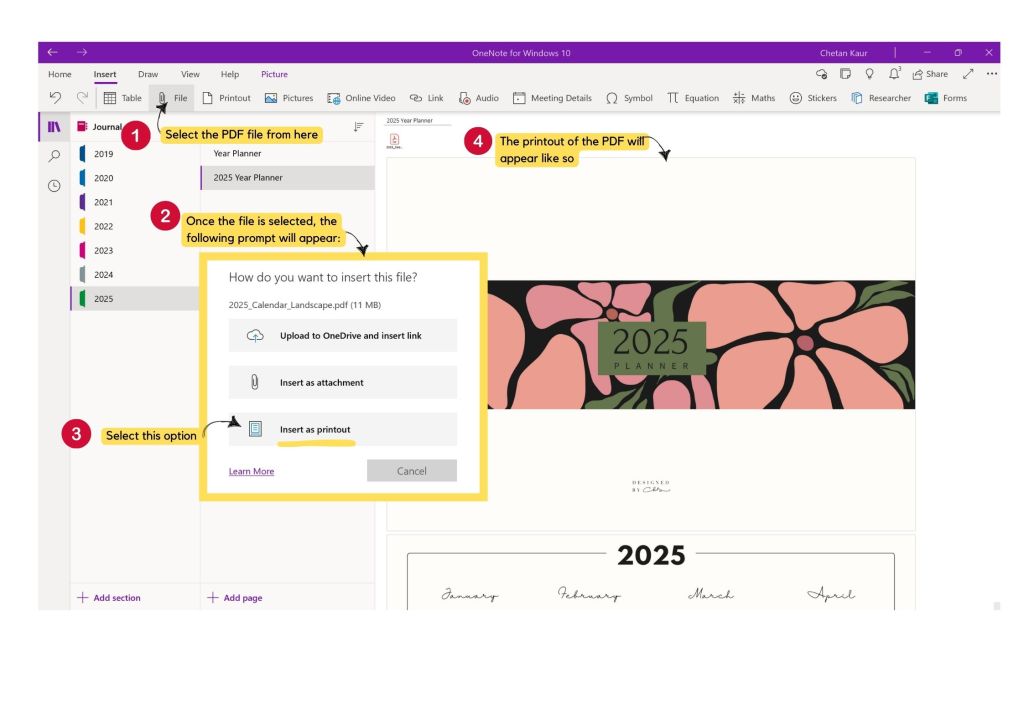
- Optional Steps:
- Organizing pages by month: I individually put each month calendar on separate pages. It reduces loading time and also eases the access of month-wise journals.
- Setting the images as background: This option makes the image part of the background. The image is fixed and doesn’t move, which makes it easier to draw and type on the calendar page. On iPad, there is no option to turn off the ‘set image as background’. But, the desktop version lets you toggle this feature on and off.

Looking for a free calendar template? Click here
 Designed by CKB
Leave a comment